
Levio Studio
Industrial Engineering Software Built for Modern Manufacturing
Video-based time study, cycle time analysis, line balancing and digital standard work for industrial engineers, continuous improvement and manufacturing operations.
How Levio Studio works
From process video to standard work, in one sequence
Each step does one job. Study the work, level the load, standardize the result.
Build the plant hierarchy
Create the structure your work lives in: plants, then lines, then processes. Every study stays attached to a real place on the floor.
Organize departments and lines
Group capacity by department and assembly line. Track how many processes each line carries and its current takt.
- Center Section Line+ New project
- Final Assembly Line+ New project
- Axle Shaft Assembly+ New project
- Sub Assembly+ New project
- Axle Shaft Assembly+ New project
List processes and open a project
Each line holds its process sequence — man, machine, or both. Open a process to start the study.
Cut work elements from video
Upload the process video and register work elements with timings and categories: value-add, walk, wait, machine auto, load and unload.
Generate work elements with AI
Levio AI reads the video and proposes element boundaries, repeated cycles and activity types. You review, classify and approve — nothing is final until you say so.
Level the workload
Build the Yamazumi-style leveling chart from man and machine studies. Create rules for the elements so the sequence is visualised clearly, then see station load against takt in one view.
Present the proposed solution
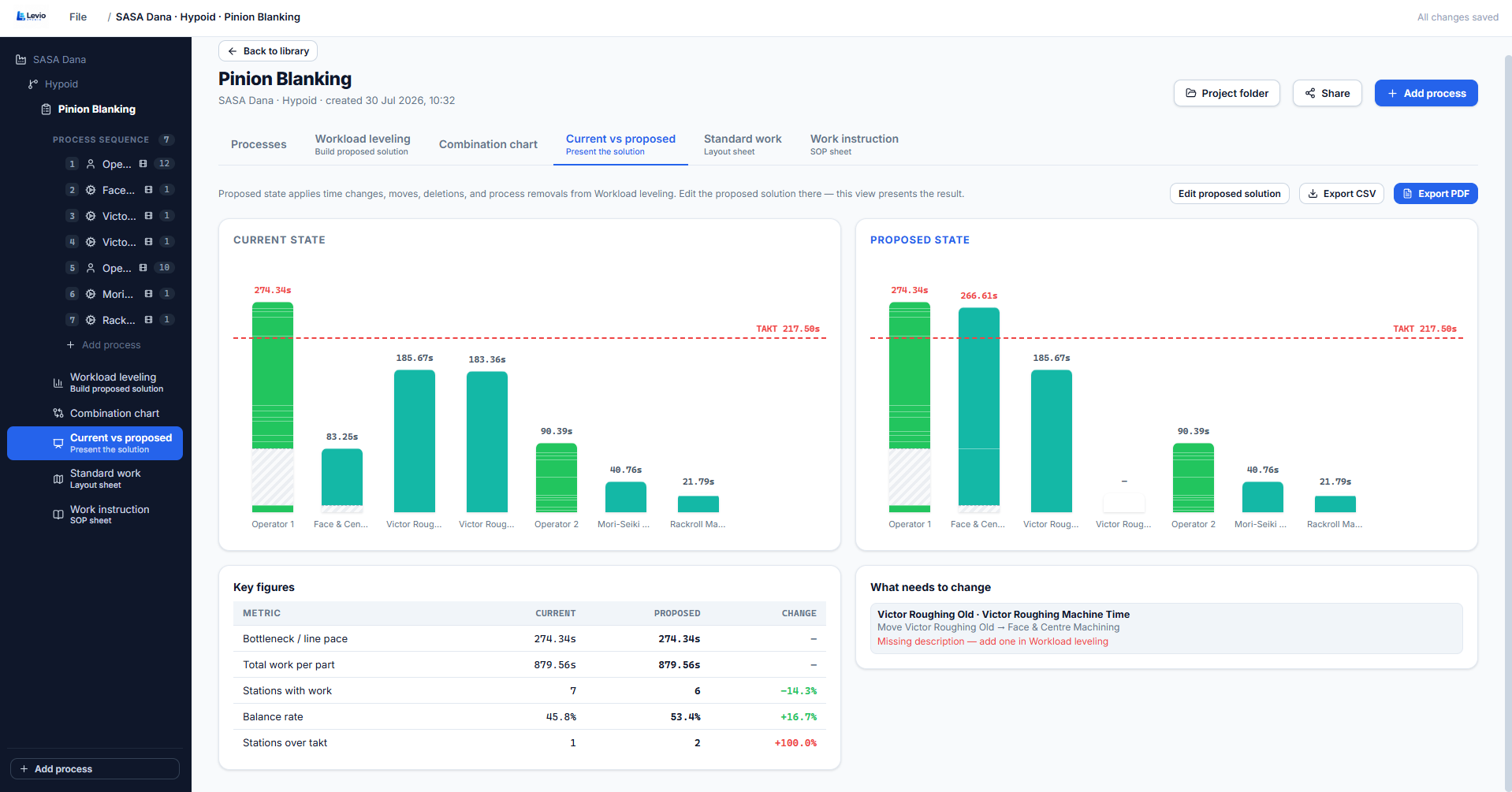
Compare current and proposed states side-by-side with stacked station charts, key figures, and a clear change list. See exactly how takt, balance rate and station over-takt move before anything changes on the line.
Standardized work and layout
Upload the floor layout, place the sequenced elements, and draw the operator path around machine blocks.
Play the sequence
Press Play sequence and watch the operator path animate across the floor layout in real time. The side panel shows every step, walk and machine cycle with its exact timing.
AI video element analysis
The AI watches the video and proposes the work elements
Instead of scrubbing frame by frame, let AI video analysis segment the process and suggest elements with timings. You review, approve, and edit.
- Faster studies — first pass of elements in minutes, not hours.
- Consistent element naming across engineers, lines and plants.
- Human-in-the-loop: every suggestion is approved or rejected by you.
- Reach and grasp fastenerVA96%
- Walk to station 2Walk91%
- Machine auto cycleAuto88%
- Load fixtureLoad84%
Built for the people who own the standard
- Industrial engineers
- Run work study from video, set standard times, and defend them with element-level data.
- Continuous improvement
- Quantify waste, model the proposed balance, and show current versus proposed before the change.
- Manufacturing engineering & plant ops
- Keep line balance, layout and standardized work aligned across every line in the plant.
What you can do with Levio Studio
One set of measured work elements drives every output — from the first time study through to the standard the operator follows.
Questions from the shop floor
Industrial engineering tools for South African manufacturers
Levio Studio gives industrial engineers in South Africa one desktop toolkit for work study: video time studies, cycle time analysis, line balancing and Yamazumi workload leveling, manning costing, production efficiency calculation and standardised work instructions — priced and billed in rand.
Time study software
Run frame-accurate time and motion studies from existing process video and register standard times per work element.
Cycle time analysis
Compare observed cycle time against takt, split value-add from walk, wait and machine time, and expose waste per station.
Line balancing & workload leveling
Stack elements into Yamazumi charts, move work between operators, and track balance rate current vs proposed.
Manning & labour costing
Turn levelled work content into required manning per shift and cost the headcount before you commit to a layout.
Production efficiency calculation
Calculate efficiency, utilisation and output potential straight from measured element data — no spreadsheet rebuild.
Work instructions & standardised work
Generate standard work combination sheets, work instructions and the operator path layout from the same study.
Get started
Buy your Levio Studio licence
Secure online payment. Your product key and Windows installer are available immediately after checkout.